
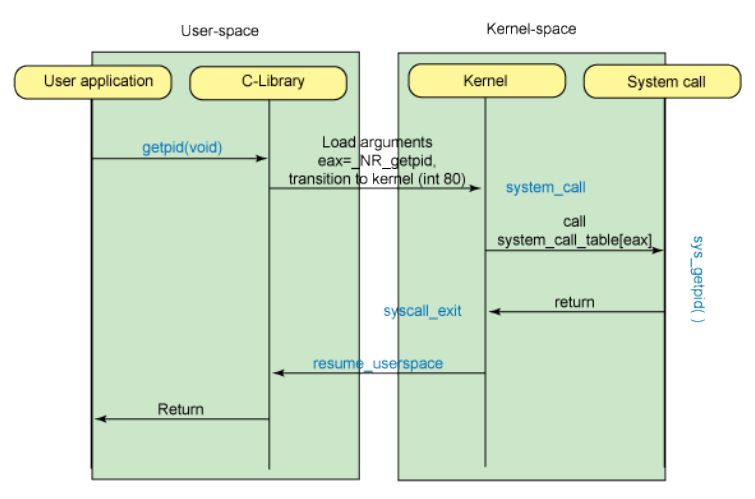
This article provides a practical overview of Linux system calls in C. It focuses on real examples you can compile and run to better understand how user-space programs interact with the Linux kernel.
1. Linux System Calls
System calls are the interface between user-space applications and the Linux kernel. They let your program request services such as file operations, memory management, process control, networking, and timing.
2. Using strace
strace helps you inspect system calls made by a program.
Basic usage
strace ls
Attach to a running process
strace -p 1234
Trace only selected syscalls
strace -e trace=open,close <command>
Write trace to a file
strace -o output.txt <command>
Trace child processes
strace -f <command>
Example debugging case
strace -e trace=file <program>
3. access: Test File Permissions
Use access() to test whether the real UID/GID of the process can read, write, execute, or simply see a file.
#include <unistd.h>
#include <stdio.h>

int main() {
    const char *filepath = "example.txt";

    if (access(filepath, F_OK) == 0) {
        printf("The file exists.\n");

        if (access(filepath, R_OK) == 0) {
            printf("Read permission granted.\n");
        } else {
            printf("Read permission denied.\n");
        }

        if (access(filepath, W_OK) == 0) {
            printf("Write permission granted.\n");
        } else {
            printf("Write permission denied.\n");
        }

        if (access(filepath, X_OK) == 0) {
            printf("Execute permission granted.\n");
        } else {
            printf("Execute permission denied.\n");
        }
    } else {
        printf("The file does not exist.\n");
    }

    return 0;
}
4. fcntl: File Locks and Operations
Use fcntl() with struct flock to coordinate access between processes.
#include <stdio.h>
#include <stdlib.h>
#include <unistd.h>
#include <fcntl.h>
#include <string.h>

int main(int argc, char* argv[]) {
    if (argc < 2) {
        printf("Usage: %s <file>\n", argv[0]);
        return 1;
    }

    char* file = argv[1];
    int fd = open(file, O_WRONLY);
    if (fd == -1) {
        perror("open");
        return 1;
    }

    struct flock lock;
    memset(&lock, 0, sizeof(lock));
    lock.l_type = F_WRLCK;

    if (fcntl(fd, F_SETLKW, &lock) == -1) {
        perror("fcntl");
        close(fd);
        return 1;
    }

    printf("Locked; press Enter to unlock... ");
    getchar();

    lock.l_type = F_UNLCK;
    if (fcntl(fd, F_SETLKW, &lock) == -1) {
        perror("fcntl");
        close(fd);
        return 1;
    }

    close(fd);
    return 0;
}
5. fsync and fdatasync: Flush Disk Buffers
To reduce data loss risk, flush pending writes to stable storage.
#include <fcntl.h>
#include <stdio.h>
#include <string.h>
#include <unistd.h>

const char* journal_filename = "journal.log";

void write_journal_entry(char* entry) {
    int fd = open(journal_filename, O_WRONLY | O_CREAT | O_APPEND, 0660);
    if (fd == -1) {
        perror("Failed to open journal file");
        return;
    }

    if (write(fd, entry, strlen(entry)) == -1) {
        perror("Failed to write entry");
        close(fd);
        return;
    }

    if (write(fd, "\n", 1) == -1) {
        perror("Failed to write newline");
        close(fd);
        return;
    }

    if (fsync(fd) == -1) {
        perror("Failed to fsync");
        close(fd);
        return;
    }

    close(fd);
}

int main() {
    char* entry = "Sample journal entry";
    write_journal_entry(entry);
    return 0;
}
6. getrlimit and setrlimit: Resource Limits
Inspect and tune process resource limits like max open files.
#include <stdio.h>
#include <stdlib.h>
#include <sys/resource.h>

int main() {
    struct rlimit limit;

    if (getrlimit(RLIMIT_NOFILE, &limit) != 0) {
        perror("getrlimit failed");
        return EXIT_FAILURE;
    }

    printf("Current Limits: soft = %ld, hard = %ld\n", limit.rlim_cur, limit.rlim_max);

    limit.rlim_cur = limit.rlim_max;

    if (setrlimit(RLIMIT_NOFILE, &limit) != 0) {
        perror("setrlimit failed");
    } else {
        printf("Soft limit raised to hard limit: %ld\n", limit.rlim_cur);
    }

    if (getrlimit(RLIMIT_NOFILE, &limit) != 0) {
        perror("getrlimit failed");
        return EXIT_FAILURE;
    }

    printf("Updated Limits: soft = %ld, hard = %ld\n", limit.rlim_cur, limit.rlim_max);

    return EXIT_SUCCESS;
}
7. getrusage: Process Statistics
Collect runtime stats like CPU time and page faults.
#include <stdio.h>
#include <stdlib.h>
#include <sys/resource.h>

int main() {
    struct rusage usage;

    if (getrusage(RUSAGE_SELF, &usage) == -1) {
        perror("getrusage failed");
        return EXIT_FAILURE;
    }

    printf("User CPU time used: %ld.%06ld sec\n", usage.ru_utime.tv_sec, usage.ru_utime.tv_usec);
    printf("System CPU time used: %ld.%06ld sec\n", usage.ru_stime.tv_sec, usage.ru_stime.tv_usec);
    printf("Minor page faults: %ld\n", usage.ru_minflt);
    printf("Major page faults: %ld\n", usage.ru_majflt);

    return EXIT_SUCCESS;
}
8. gettimeofday: System Time
Get current wall-clock time with microsecond resolution.
#include <stdio.h>
#include <sys/time.h>

int main() {
    struct timeval tv;

    if (gettimeofday(&tv, NULL) == 0) {
        printf("Current time: %ld seconds and %ld microseconds since Epoch\n",
               (long)tv.tv_sec, (long)tv.tv_usec);
    } else {
        perror("gettimeofday failed");
        return 1;
    }

    return 0;
}
9. mlock Family: Lock Pages in RAM
Prevent sensitive or latency-critical pages from being swapped out.
#include <stdio.h>
#include <stdlib.h>
#include <string.h>
#include <sys/mman.h>

int main() {
    const size_t size = 1024 * 1024;
    void *buffer = malloc(size);
    if (!buffer) {
        perror("malloc failed");
        return 1;
    }

    memset(buffer, 0, size);

    if (mlock(buffer, size) == -1) {
        perror("mlock failed");
        free(buffer);
        return 1;
    }

    printf("Memory is locked in RAM.\n");

    if (munlock(buffer, size) == -1) {
        perror("munlock failed");
    }

    free(buffer);
    return 0;
}
10. mprotect: Change Memory Permissions
Change a memory region from read/write to read-only and back.
#include <stdio.h>
#include <stdlib.h>
#include <string.h>
#include <sys/mman.h>
#include <unistd.h>

int main() {
    size_t pagesize = sysconf(_SC_PAGESIZE);
    void* buffer = malloc(pagesize);

    if (buffer == NULL) {
        perror("malloc failed");
        return 1;
    }

    strcpy(buffer, "Hello, mprotect!");

    if (mprotect(buffer, pagesize, PROT_READ) == -1) {
        perror("mprotect failed to set read-only");
        free(buffer);
        return 1;
    }

    printf("Memory set to read-only: %s\n", (char*)buffer);

    if (mprotect(buffer, pagesize, PROT_READ | PROT_WRITE) == -1) {
        perror("mprotect failed to set read-write");
        free(buffer);
        return 1;
    }

    strcpy(buffer, "Now in read-write mode");
    printf("Updated buffer: %s\n", (char*)buffer);

    free(buffer);
    return 0;
}
11. nanosleep: High Precision Sleep
Suspend execution with fine granularity.
#include <stdio.h>
#include <time.h>

int main() {
    struct timespec req = {
        .tv_sec = 2,
        .tv_nsec = 500000000L
    };

    printf("Sleeping for 2.5 seconds...\n");

    if (nanosleep(&req, NULL) == -1) {
        perror("nanosleep");
        return 1;
    }

    printf("Wake up!\n");
    return 0;
}
12. readlink: Read Symbolic Links
Read the target path of a symbolic link.
#include <stdio.h>
#include <stdlib.h>
#include <unistd.h>

int main(int argc, char *argv[]) {
    if (argc != 2) {
        fprintf(stderr, "Usage: %s <symlink>\n", argv[0]);
        return EXIT_FAILURE;
    }

    char *symlinkPath = argv[1];
    char buf[1024];

    ssize_t len = readlink(symlinkPath, buf, sizeof(buf) - 1);
    if (len == -1) {
        perror("readlink");
        return EXIT_FAILURE;
    }

    buf[len] = '\0';
    printf("The symbolic link '%s' points to '%s'\n", symlinkPath, buf);

    return EXIT_SUCCESS;
}
13. sendfile: Fast Data Transfers
Copy data between file descriptors without bouncing through user space.
#include <stdio.h>
#include <stdlib.h>
#include <fcntl.h>
#include <unistd.h>
#include <sys/sendfile.h>
#include <sys/stat.h>

int main(int argc, char *argv[]) {
    if (argc != 3) {
        fprintf(stderr, "Usage: %s <source_file> <destination_file>\n", argv[0]);
        return EXIT_FAILURE;
    }

    int src = open(argv[1], O_RDONLY);
    if (src == -1) {
        perror("Failed to open source file");
        return EXIT_FAILURE;
    }

    int dest = open(argv[2], O_WRONLY | O_CREAT | O_TRUNC, 0666);
    if (dest == -1) {
        perror("Failed to open destination file");
        close(src);
        return EXIT_FAILURE;
    }

    struct stat stat_src;
    if (fstat(src, &stat_src) == -1) {
        perror("Failed to stat source file");
        close(src);
        close(dest);
        return EXIT_FAILURE;
    }

    off_t offset = 0;
    ssize_t bytesSent = sendfile(dest, src, &offset, stat_src.st_size);
    if (bytesSent == -1) {
        perror("Failed to send file");
        close(src);
        close(dest);
        return EXIT_FAILURE;
    }

    printf("Copied %zd bytes from %s to %s\n", bytesSent, argv[1], argv[2]);

    close(src);
    close(dest);
    return EXIT_SUCCESS;
}
14. setitimer: Interval Timers
Use POSIX interval timers to trigger periodic signals.
#include <signal.h>
#include <stdio.h>
#include <string.h>
#include <sys/time.h>
#include <unistd.h>

void handle_sigalrm(int sig) {
    (void)sig;
    printf("Timer expired\n");
}

int main() {
    struct itimerval timer;
    struct sigaction sa;

    memset(&sa, 0, sizeof(sa));
    sa.sa_handler = &handle_sigalrm;
    sigaction(SIGALRM, &sa, NULL);

    timer.it_value.tv_sec = 2;
    timer.it_value.tv_usec = 0;
    timer.it_interval.tv_sec = 2;
    timer.it_interval.tv_usec = 0;

    if (setitimer(ITIMER_REAL, &timer, NULL) == -1) {
        perror("setitimer");
        return 1;
    }

    while (1) {
        pause();
    }

    return 0;
}
15. sysinfo: System Statistics
Retrieve uptime, memory, and load information from the kernel.
#include <stdio.h>
#include <sys/sysinfo.h>

int main() {
    struct sysinfo info;

    if (sysinfo(&info) != 0) {
        perror("sysinfo");
        return 1;
    }

    printf("Uptime: %ld seconds\n", info.uptime);
    printf("Total RAM: %lu bytes\n", info.totalram);
    printf("Free RAM: %lu bytes\n", info.freeram);
    printf("Processes: %u\n", info.procs);

    return 0;
}
16. uname: Basic System Information
Get OS/kernel and machine information using uname().
#include <stdio.h>
#include <sys/utsname.h>

int main() {
    struct utsname unameData;

    if (uname(&unameData) < 0) {
        perror("uname");
        return 1;
    }

    printf("System Name: %s\n", unameData.sysname);
    printf("Node Name:  %s\n", unameData.nodename);
    printf("Release:    %s\n", unameData.release);
    printf("Version:    %s\n", unameData.version);
    printf("Machine:    %s\n", unameData.machine);

    return 0;
}
This guide is intended as a practical starting point. In production code, always check return values, inspect errno, and design robust error handling for each syscall path.